# Antares Coins

Antares Coins is one of the features provided by Antares that serves as one of the payment methods.

Here are the steps to top up Antares Coins:

1. Log In and open the Antares console page, click **"Account"**

<figure><img src="https://3873791589-files.gitbook.io/~/files/v0/b/gitbook-x-prod.appspot.com/o/spaces%2F7cujmJ5QHdJaAjH815aZ%2Fuploads%2FuxXEtQxxPAaYFZHWpwZ3%2Fimage.png?alt=media&#x26;token=98698063-d125-4c01-99fc-66254658ce24" alt=""><figcaption></figcaption></figure>

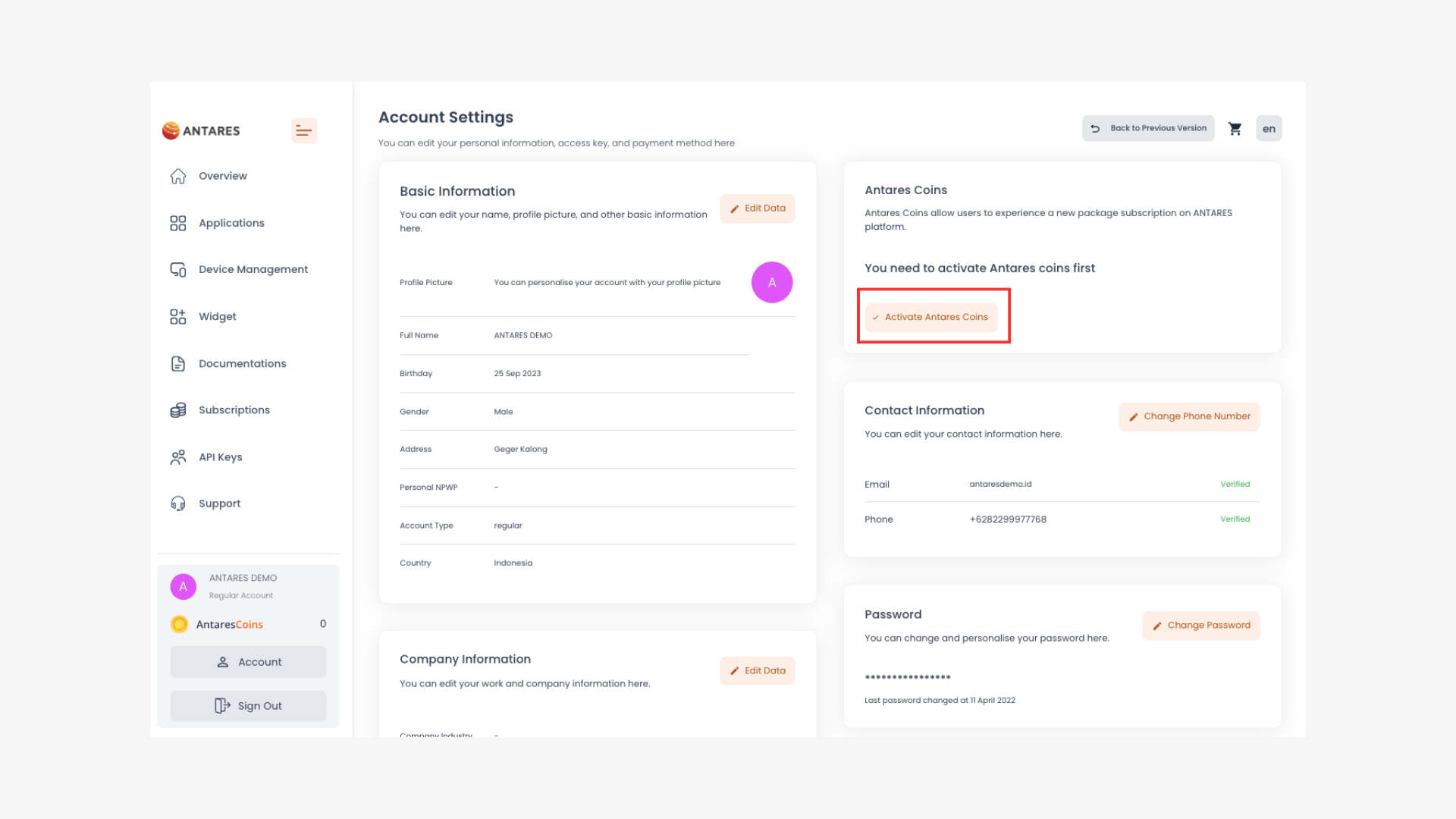
2. On the Account page, click **"Activate Antares Coins"**

<figure><img src="https://3873791589-files.gitbook.io/~/files/v0/b/gitbook-x-prod.appspot.com/o/spaces%2F7cujmJ5QHdJaAjH815aZ%2Fuploads%2FTywek3BmaO0xMZkzs79x%2Fimage.png?alt=media&#x26;token=b5aada7d-bab7-4fa8-b394-74ca81aadc4f" alt=""><figcaption></figcaption></figure>

{% hint style="info" %}
Make sure you activate your Antares Coins so you can use them.
{% endhint %}

3. After activating, click **"Top Up Antares Coins"**

<figure><img src="https://3873791589-files.gitbook.io/~/files/v0/b/gitbook-x-prod.appspot.com/o/spaces%2F7cujmJ5QHdJaAjH815aZ%2Fuploads%2FWpjAIjPuI4QSCyhOVAsH%2Fimage.png?alt=media&#x26;token=3b2de654-68eb-4e1c-8b01-4d30acf3ab97" alt=""><figcaption></figcaption></figure>

4. Select the top up amount and click **"Continue Top up Antares Coins"**

<figure><img src="https://3873791589-files.gitbook.io/~/files/v0/b/gitbook-x-prod.appspot.com/o/spaces%2F7cujmJ5QHdJaAjH815aZ%2Fuploads%2FrQlG4YRKQHJEEhsvpHqJ%2Fimage.png?alt=media&#x26;token=055b8aa4-f137-406a-9119-b6a01d46b429" alt=""><figcaption></figcaption></figure>

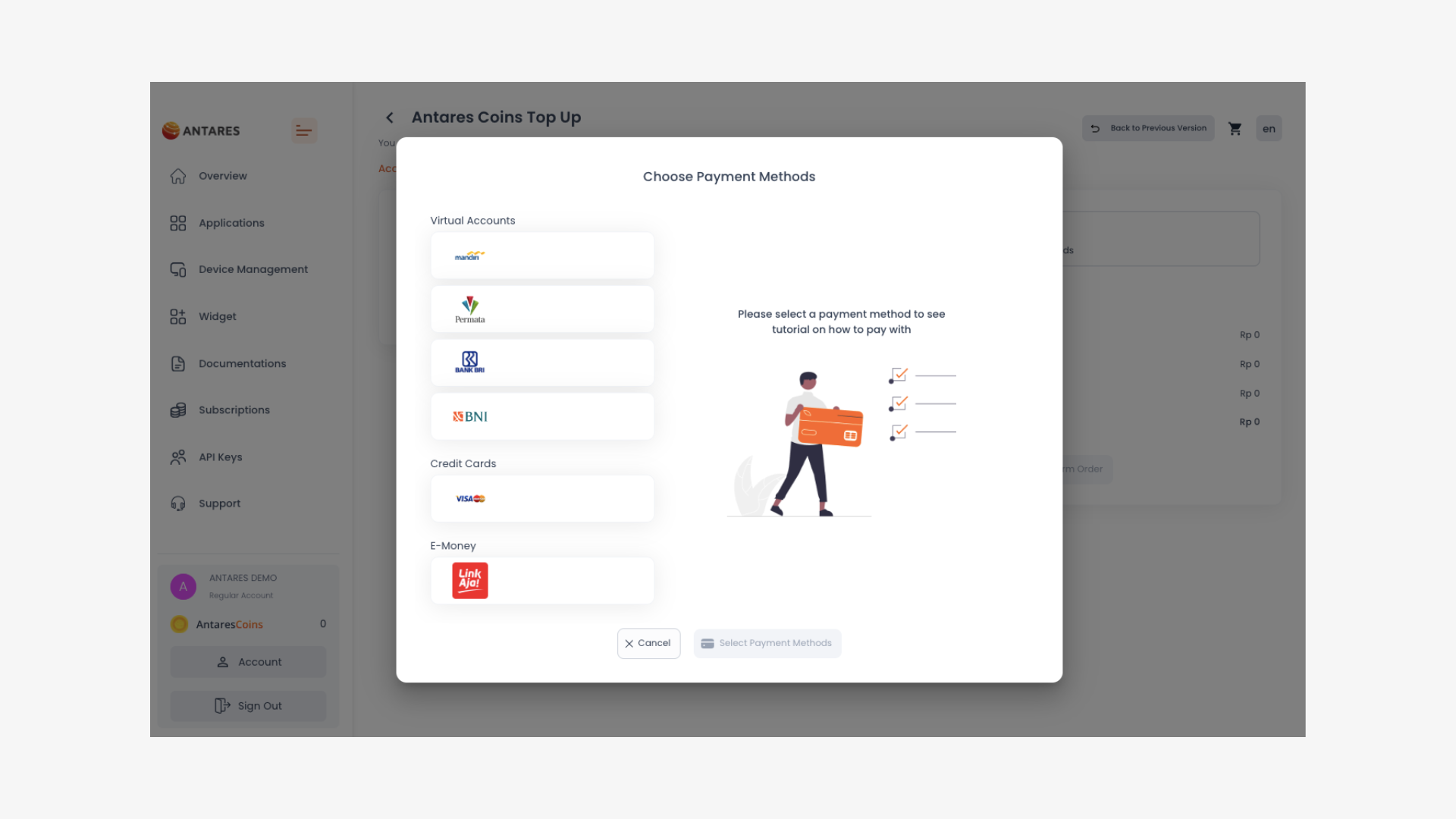
5. Choose a payment method

<figure><img src="https://3873791589-files.gitbook.io/~/files/v0/b/gitbook-x-prod.appspot.com/o/spaces%2F7cujmJ5QHdJaAjH815aZ%2Fuploads%2FIDUZp2LhtR4t1kZs4hO9%2Fimage.png?alt=media&#x26;token=50075977-381d-4fa7-b2b1-935c3bcc4567" alt=""><figcaption></figcaption></figure>

5. Proceed with the payment

You can view the payment procedure on the following page: